| Software | BitScope DSO | User Guide |
 BitScope DSO is the premier software for all BitScopes
A quick example demonstrates what DSO can do...The latest DSO version supports all current model BitScopes and configures itself according the connected BitScope. The screenshot above shows DSO connected to the Pocket Analzyer and below is a photo of the setup we used to generate this screenshot. This little circuit models a logic controller driving an elecro-mechanical relay. It generates multiple time related analog and logic signals similar to any mixed signal system (in this case a PLC). At a glance, BitScope DSO can provide huge amount of information about this circuit. 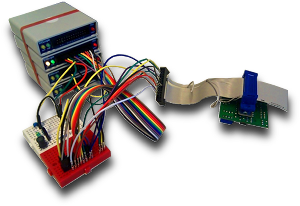 Logic channels D0 to D5 (white through to green in the screenshot) show six channels of logic data from which numerous timing measurements can be made. The controller uses the AND combination of D0 to D3 to drive a tiny switch which when activated disconnects the current flowing through the relay's inductor. This circuit responds with "ringing" which is an undesirable artefact we wish to measure. The ringing is captured simultaneously using BitScope's analog channels; CH-A (yellow) shows the impulse response in the driver current during the transition and CH-B (green) shows the voltage across the relay's inductor. This is a 3.3V system and the voltage cursors are set to track the MIN and MAX voltages on CH-B which reports a peak-to-peak voltage across the inductor 9.066V. In a real PLC circuit this amount of over-voltage relative to the supply voltage may be a significant problem! The time cursors report the first cycle of the oscillation starting at the trigger and ending one period later. This shows a period of 48us or an oscillation frequency of 20.83' kHz. The blue "time band" on the analog and logic displays highlights this region of interest and channels D6 and D7 are configured to show the points at which the analog voltage crosses the trigger level. ...and this is just the beginning...All the information in this example was derived from a single screenshot of a mixed signal system captured using BitScope BS10 and BitScope DSO. When used interractively there are a huge range of other measurements that are possible. DSO captures, displays and records analog waveforms, logic traces, frequency spectra, X/Y plots and timing diagrams. It can perform all sort of signal measurements real-time as you adjust its parameters using its intuitive Act On Touch user interface. The remainder of this user guide explains all these details. *The latest DSO version at the time of publication of this guide is DSO 2.5 DA15G which runs on 32 and 64 bit versions of Windows XP to Windows 8, Mac OS X Lion+, most recent Linux distributions and Raspberry Pi. This version is a limited beta release. Future releases for Window 8, Android and iOS are planned and this guide includes some information about those versions. Touch screen support is available via Windows Touch in the current release. |
Copyright © 2023 BitScope Designs
