| Download |
BitScope Network ConfigurationA network connected BitScope normally requires no configuration if it is connected to the same LAN as the PC and there is only one BitScope connected to the LAN at the same time. 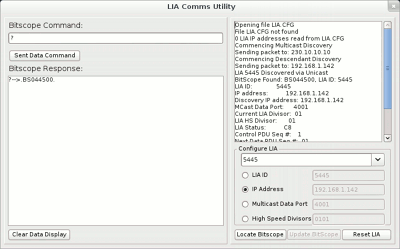 If you are using more than one BitScope at once or if the BitScope is connected to a different LAN (i.e. via a gateway) you will likely need to configure it for use first by assigning it an appropriate IP address. The Network Configuration Tool (for Windows) may be downloaded (see top right of this page) to do this. It uses UDP multicast addressing for plug and play operation if the BitScope is connected directly to the PC (via the supplied cross-over cable) or if it is connected on the same LAN as the PC. After the BitScope has been configured it can then be connected on a remote LAN or shared on a local LAN with other BitScopes. The configuration settings are stored in FLASH memory on the BitScope itself so they will persist. When the Network Tool is started on the PC it appears as shown above and it automatically attempts to detect all connected network BitScopes. You do not need to know the IP address of the BitScope to configure it, nor do you need to assign one to use this tool but the BitScope must be directly connected to the PC or connected on the same LAN as the PC for the tool to work (unless you already know its IP address in which case you can use the LIA.CFG file). The tool discovers the BitScopes on the LAN via the multicast address 230.10.10.10. The typical sequence of events the configuration tool will report it if can locate one or more BitScopes should look something like this: Opening file LIA.CFG File LIA.CFG not found 0 LIA IP addresses read from LIA.CFG Commencing Multicast Discovery Sending packet to: 230.10.10.10 Commencing Descendant Discovery Sending packet to: 192.168.1.142 LIA 5445 Discovered via Unicast BitScope Found: BS044500, LIA ID: 5445 LIA ID: 5445 IP address: 192.168.1.142 Discovery IP address: 192.168.1.142 MCast Data Port: 4001 Current LIA Divisor: 01 LIA HS Divisor: 01 LIA Status: C8 Control PDU Seq #: 1 Next Data PDU Seq #: 01 BitScope with LIA ID: 5445 Selected BitScopes Discovery Completed The first three lines report that an attempt was made to open (the non-existent in this example) LIA.CFG (text) file. If this file exists (in the same directory as the network tool) the IP addresses it lists (one per line) will be used to locate BitScopes before MULTICAST is used to to the same thing. The next two lines indicate that multicast discovery is attempted followed by specific device discovery. In this case one BS442N model BitScope was detected. It has an LIA ID of 5445, an IP address of 192.168.1.142 (the factory default) and various other parameters. The ID and IP address are the only important ones from a configuration point of view. Below the diagnostic window in the network configuration tool is the configuration panel. This provides a drop-down menu with all the detected BitScopes and four configuration widgets used to assign various parameters. The only one you'll normally need to change is the IP address. 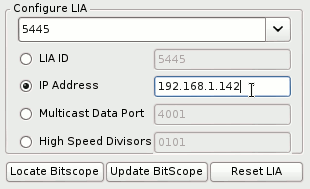 Assigning an IP AddressIt is beyond the scope of this guide to advise what IP address you should use. It will depend on the sub-nets used on your LAN but it must be an unmanaged address IP address (i.e. one that it not allocated by any DHCP servers on your LAN); BitScope should be thought of as a "server" with a fixed (and known) IP address to which clients will connect to use it. Select the IP Address radio button (as shown), type in your IP address and click Reset LIA. In about 5 to 10 seconds (after the BitScope has rebooted, reassigned the new address and performed it's power-on Q/A tests) it will respond at the newly assigned IP address (as well as the multicast address 230.10.10.10 on which all BitScopes always respond). Changing other parametersThe only other parameter we recommend you change if you really need to is the LID ID. This is only necessary in situations where you want to use the multicast address with multiple BitScopes. Normally we recommend assigning each BitScope it's own IP address and use them individually but there are some custom applications where multicast address is preferred (e.g. large concurrent data acquisition racks). The Multicast data port and High Speed Devisors should also not normally need to be changed. Troubleshooting Network ConnectionsThe advice above describes the most common case where the PC is connected to one LAN (or crossover cable) which is connected to one BitScope. If one or more of these conditions are not met, or if the PC has unusual routing or firewall rules you may need to perform some additional configuration (on the PC) to then configure the BitScope. While these additional steps are rarely required, it is beyond the scope of this guide to cover all the possibities for all supported operating systems so instead we'll outline each potential issue and how to resolve it in general terms. 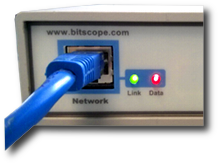 First confirm your BitScope is working correctly; when powered on while connected to an active network the two LEDs on the back panel will light up as shown here. After 5 seconds the Data LED will turn off. This indicates that BitScope's power-on network and capture engine self-tests have passed successfully. If the Data LED does not light up or if it stays illuminated after 5 seconds or if the Link LED does not light up when connected to an active network please contact us for technical support after checking through the following:
If you still have problems, especially if you are upgrading from older software versions, the configuration files used by the application software may have been corrupted. The file most likely to cause problems (if corrupt) is the probe file. The Local Probe File (details)On Windows 7 & 8 the local probe file is located at: C:\Users\<user>\AppData\Local\BitScope\BitScope.prb or on older versions of Windows: C:\Documents and Settings\<user>\Local Settings\Application Data\BitScope\ BitScope.prb where <user> is your logged in user name on your PC. Delete this file to force the software to recreate it with correct information. The Global Probe File (details)There is another globally configurable probe file. This is unlikely to be corrupt but if you suspect it is, and you have adminstrator privileges on your PC to modify it, you can delete (or comment out) its contents (don't delete the file itself). It is highly unlikely you will need to do this but we mention it here as a last resort. BitScope IP AddressNetwork BitScopes listen on both a MULTICAST and UNICAST IP address. They also require two UDP network ports to be accessible. The default Network BitScope configuration is: MULTCAST: 230.10.10.10 (multicast address) UNICAST: 192.168.1.73 (Model BS3xxN) UNICAST: 192.168.1.142 (Model BS4xxN) UDP Ports: 0x4001,0x4002 (network ports used) At a minimum when you first connect your Network BitScope to a LAN or directly to your PC, the MULTICAST address and the network ports listed here must be reachable. Read on to learn how to ensure this. Default (Zero Configuration) OperationIf the Network BitScope is directly connected to the PC or connected via a single LAN and there is only one BitScope connected this way, MULTICAST addressing may be used and is normally preferred. This is the default and normally requires no special configuration. Simply plug-in and power-up the BitScope and start the DSO software on the PC to use your BitScope. Some routers disable multicast traffic by default. Be sure to enable multicast traffic on your router if this is the case (if you want to use multicast addressing, see below for the unicast alternative) If none of this works (the DSO cannot find the BitScope) read on... Cross-over cable (Direct) ConnectionIf BitScope is directly connected to your PC ethernet port using the supplied crossover cable you may need to configure the PC ethernet port manually to enable communication as described earlier. This is because Windows normally configures ethernet as "automatic". When the PC is connected to a LAN with a DHCP server available (ie, most networks) the ethernet port will be configured by the LAN automatically. However, when you directly connect BitScope to your PC ethernet port via a crossover cable and the port is set to "automatic" the port may not activate and you will not be able to communicate with BitScope. In this case you must to amend the properties of the PC's ethernet port for manual operation and enter an appropriate IP address for the PC. For example assuming BitScope is as factory programmed, a PC IP address of 192.168.1.1 and netmask of 255.255.255.0 for the PC should work. Network Routing (Default)If BitScope is connected to the same LAN as your PC (or BitScope is directly connected to your PC) and the PC's ethernet port is your "default route" you should be able to reach the BitScope from the PC with no special routing being required (on your PC). This assumes there is no firewall running or the firewall is already configured to allow UDP access to ports 01 and 02 on multicast address 230.10.10.10. If not, see Firewall Rules below. Network Routing (Explicit)If your LAN is not the default route for your PC you may need to add a new route for BitScope's IP address. This is true for both UNICAST and MULTICAST addressing. Your LAN will almost always not be the default route if your PC is also connected to the Internet via a dialup or DSL link (ie, not via the LAN) or if your PC is connected to multiple LANs and the other LAN is the default route (only one of them can be the default). To set up a network route for the ethernet interface on your PC on which the BitScope is connected, open a command window and type: route -p add 230.10.10.10 mask 255.255.255.255 192.168.2.100 METRIC 25 Replace the 192.168.2.100 with the IP address of your PC's ethernet port (it will be a different address !). This example shows routing assignment for MULTICAST addressing (230.10.10.10). You must do the same for the UNICAST address (if using UNICAST addressing). Firewall RulesCommunication with Network Bitscopes uses the UDP protocol via ports 0x4001 and 0x4002 (ie, hexadecimal values). The most important port is 0x4001 (the other is used by LIAcomms only). To use BitScope you must ensure that any firewall rules set up on your PC and anywhere else on the network between BitScope and the PC do not block these UDP/IP ports. Refer to your firewall documentation for how to remove blocks placed on these UDP ports if you find you cannot talk to BitScope despite having checked the IP address, UDP ports and IP routing are all OK. When first connecting BitScope to your LAN or PC we recommend you disable all firewall and related programs on your PC until you have successfully operated BitScope from that PC. Then you may reactivate the firewall (assuming you've set up the correct rules first) to be able to continue working with BitScope. If BitScope "stops working" at this point you will know that the firewall rules are not set up correctly. Unicast Operation (Foreign Networks)If the Network BitScope is on a different LAN (ie, there is one or more routers between the PC and the BitScope), or you are using more than one BitScope on a single LAN, the UNICAST address must be used. In this case the Bitscope can be reached at the UNICAST IP address listed above or if that address is inappropriate for your LAN setup, any other IP address that you choose to assign to it (see LIAcomms). Of course if you have two of more BitScopes on the same network they must be assigned different UNICAST addresses, otherwise you will not be able to talk to them independently. Address Assignment (Avoid Collisions)There are some issues to consider when assigning a BitScope address. First you should ensure that no other device connected to the same network is using the IP address you assign to BitScope. Second you should check that any DHCP or BOOTP servers (responsible for the dynamic assignment IP addresses for PC or other devices that are not be permanently connected to the network) are not configured to assign from a range of addresses that include the address(es) you assign to your BitScope(s). Third, if you change the BitScope IP address and reconnect it to the same network you may need to flush relevant APR caches (ask your LAN adminstrator for help with this if you don't know what this means). See LIAcomms' README.txt file for instructions about how to reassign a Network BitScope IP address. Note that a consequence of IP address collision may be that BitScope appears to "vanish" from the network or otherwise become unreachable. Repowering BitScope may apparently "recover" it but the next time a conflicting device talks on the network it may disappear again. This is easy to misdiagnose as a fault in BitScope when all that is wrong is a misconfigured IP address. Take care. If you suspect IP address collision is the root of a problem, using LIAcomms assign BitScope a different (reachable) IP address known to be be unused on that LAN and try again. A very useful tool to help diagnose faults such as this is WireShark. This free network packet analyzer run on your own PC can tell you what packets are really on your LAN as opposed to what you or your network adminstrator may think are on the LAN (they are frequently different !). Rely on what wireshark tells you :-) Busy Multicast/Broadcast NetworksIf a Network BitScope is connected to a network that also carries a lot of unrelated multicast and/or broadcast traffic it may be a good idea to configure a VLAN for the BitScope devices so they do not see this other broadcast traffic. While not strictly necessary, doing so will help improve performance of the BitScope devices because they will not need to deal with the extraneous broadcast traffic (which requires all devices on the LAN to respond, even if the traffic is not destined for them). Ask your network adminstrator for help with this if required because it may require configuration of the network switche ports to which the BitScopes are connected. |
Copyright © 2023 BitScope Designs